Testplane in GitHub Actions
Introduction
To run Testplane in GitHub CI, there's a dedicated GitHub Action that:
- Handles caching of local browsers (if used);
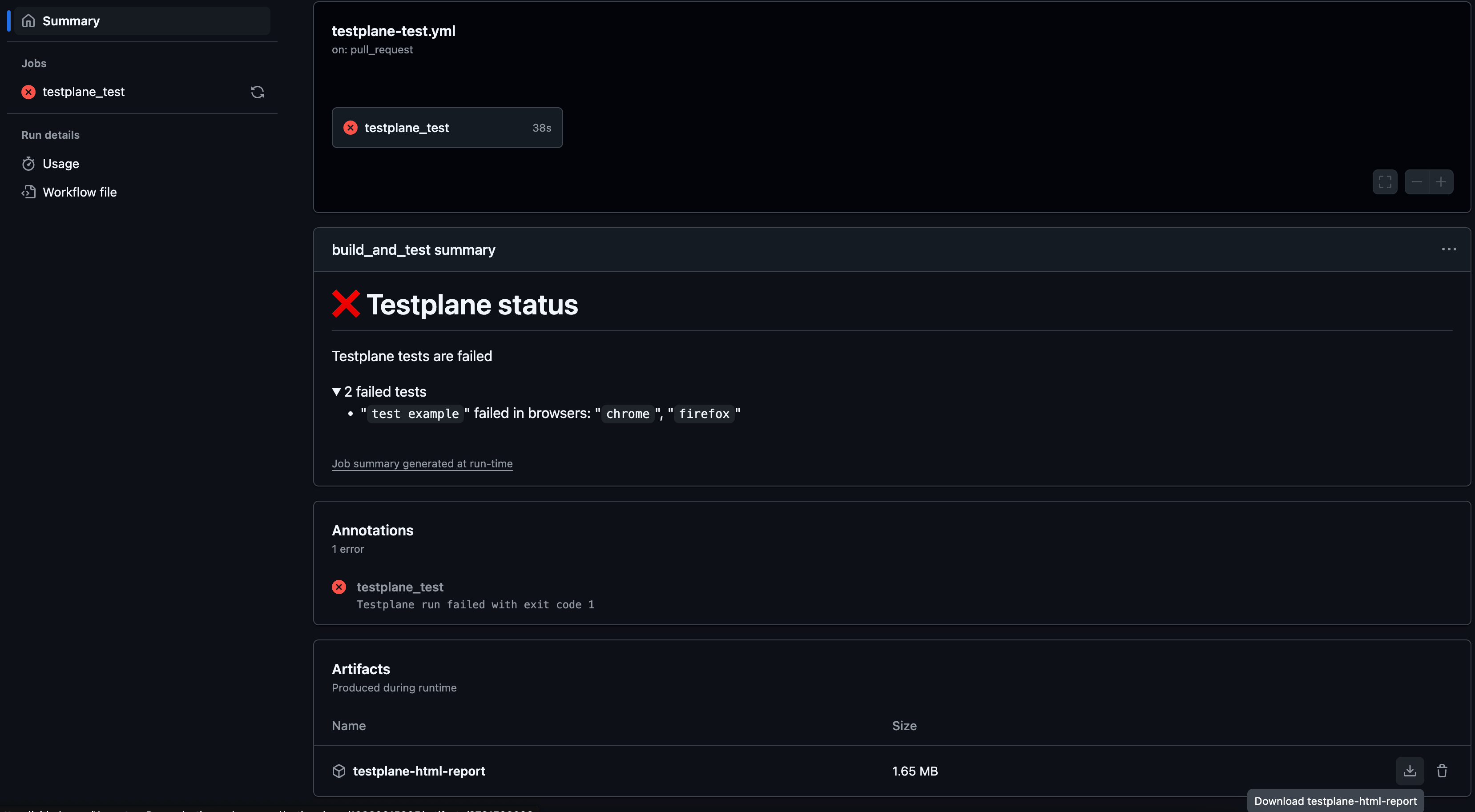
- Writes statistics about failed tests to Job Summary;
- Helps display HTML reports with test results in the browser.
Configuration
Basic workflow to run Testplane:
name: Testplane CI

on: # Workflow trigger rules
    push:
        branches: [master]
    pull_request:
        branches: [master]

jobs:
    testplane_test:
        runs-on: ubuntu-latest
        steps:
            - name: Checkout repository
              uses: actions/checkout@v4

            - name: Use Node.js 18
              uses: actions/setup-node@v3
              with:
                  node-version: 18.x

            - name: Cache npm dependencies
              uses: actions/cache@v3
              with:
                  path: ~/.npm
                  key: ${{ runner.os }}-node-${{ hashFiles('**/package-lock.json') }}

            - name: Install npm deps
              run: npm install

            - name: Run Testplane
              id: testplane
              uses: gemini-testing/gh-actions-testplane@v1
The "gemini-testing/gh-actions-testplane" action supports the following parameters:
| Parameter | Default Value | Description |
cwd | . | Relative directory to run Testplane from (useful for monorepos) |
package-manager | npm | Package manager used in the project (one of: npm, pnpm, yarn) |
html-report-prefix | testplane-reports | Path prefix for HTML reporter reports |
config-path | '' | Path to custom Testplane config |
storybook | '' | Enable to use @testplane/storybook plugin tests (e.g., |
set | '' | List of test sets (comma-separated) |
browser | '' | List of browsers for testing (comma-separated) |
grep | '' | Grep expression to select specific tests |
Example action with Testplane run using all parameters
- name: Run Comprehensive Testplane Suite
  id: testplane
  uses: gemini-testing/gh-actions-testplane@v1
  with:
      cwd: "projects/my-project-name" # Specify project path (for monorepos)
      package-manager: "yarn" # Use yarn instead of npm
      html-report-prefix: "reports/testplane" # Save reports to existing reports directory (for preserving reports on gh-pages)
      config-path: "configs/testplane.conf.js" # Use custom config path
      storybook: "true" # Run tests from `@testplane/storybook` plugin
      set: "smoke,regression" # Run only selected test sets
      browser: "linux-chrome,linux-firefox" # Run tests in two browsers only
      grep: "Login" # Run only tests containing 'Login' in their name
Launching chrome in GitHub CI
GitHub CI only works with headless browsers.
Also, to ensure Chrome browsers function properly in CI, you need to add the --no-sandbox argument to the Chrome browser launch options as follows:
{
    // ... other Testplane settings
    headless: true, // Essential for GitHub CI
    browsers: {
        // ... other browsers,
        "linux-chrome": {
            // ... other browser settings
            desiredCapabilities: {
                // .. other desired capabilities
                browserName: "chrome",
                browserVersion: "135",
                "goog:chromeOptions": {
                    args: ["--no-sandbox"] // Essential for GitHub CI
                }
            }
        }
    }
}
Upload HTML Report Archive
Add this step to upload an HTML report archive:
- name: Upload report
  if: always() && steps.testplane.outputs.html-report-path # Run step if report exists
  uses: actions/upload-artifact@v4
  with:
      name: testplane-html-report
      path: ${{ steps.testplane.outputs.html-report-path }} # Path where report is saved
This will add an HTML report artifact to the job summary:
View HTML Reports in Browser
To view reports directly in the browser via GitHub Pages:
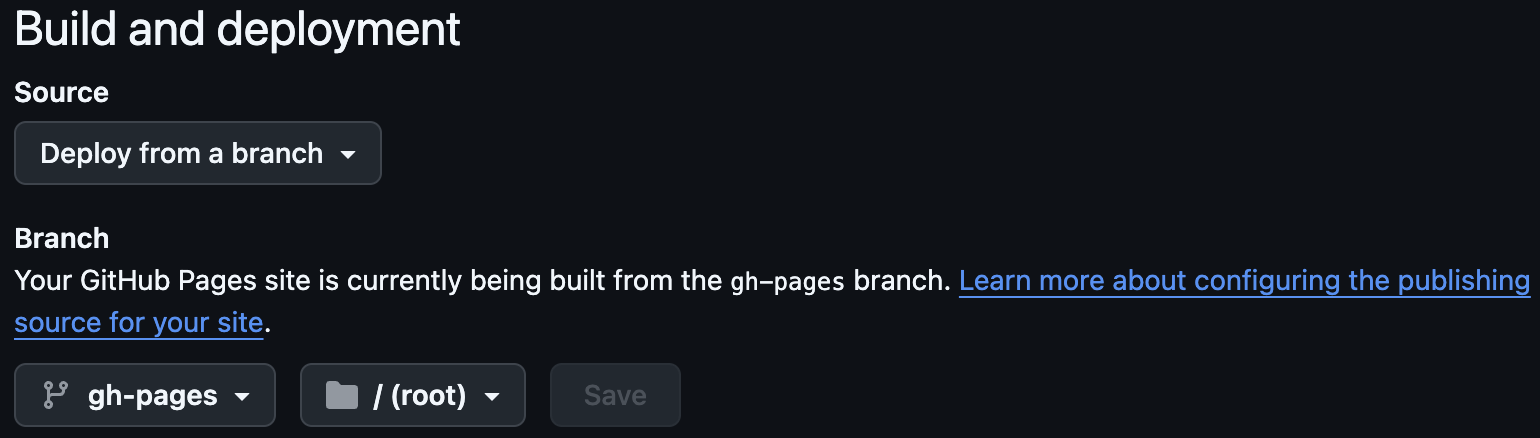
- Set up GitHub Pages (Settings → Pages on the repository page):
- Update job permissions:
jobs:
    testplane_test:
        runs-on: ubuntu-latest
        permissions:
            contents: write # Required to deploy reports to gh-pages
            pull-requests: write # Required to post report links in PR comments
        steps:
- Replace the upload step with these two steps:
- name: Deploy report # Deploys report to gh-pages
  if: always() && steps.testplane.outputs.html-report-path
  uses: peaceiris/actions-gh-pages@v4
  with:
      github_token: ${{ secrets.GITHUB_TOKEN }} # Auto-provided by GitHub
      publish_dir: ${{ steps.testplane.outputs.html-report-path }}
      destination_dir: ${{ steps.testplane.outputs.html-report-path }}
      keep_files: true

- name: Comment PR with link to Testplane HTML report
  if: always() && steps.testplane.outputs.html-report-path
  uses: thollander/actions-comment-pull-request@v3
  with:
      message: |
          ### Testplane run finished
          Testplane HTML report is available at https://${{ github.repository_owner }}.github.io/${{ github.event.repository.name }}/${{ steps.testplane.outputs.html-report-path }}
      comment-tag: testplane_html_report_link
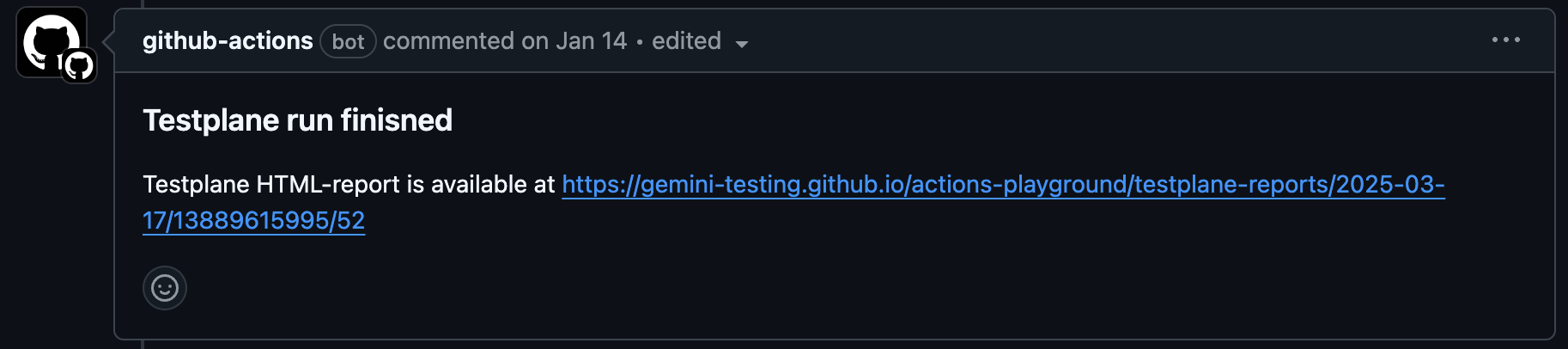
PR comments will now include a direct link to the HTML report:
Final workflow example:
name: Testplane CI

on: # Workflow trigger rules
    push:
        branches: [master]
    pull_request:
        branches: [master]

jobs:
    testplane_test:
        runs-on: ubuntu-latest
        permissions:
            contents: write # Required to deploy reports to gh-pages
            pull-requests: write # Required to post report links in PR comments
        steps:
            - name: Checkout repository
              uses: actions/checkout@v4

            - name: Use Node.js 18
              uses: actions/setup-node@v3
              with:
                  node-version: 18.x

            - name: Cache npm dependencies
              uses: actions/cache@v3
              with:
                  path: ~/.npm
                  key: ${{ runner.os }}-node-${{ hashFiles('**/package-lock.json') }}

            - name: Install npm deps
              run: npm install

            - name: Run Testplane
              id: testplane
              uses: gemini-testing/gh-actions-testplane@v1
              with:
                  html-report-prefix: testplane-reports # Report directory path

            - name: Deploy report # Deploys report to gh-pages
              if: always() && steps.testplane.outputs.html-report-path
              uses: peaceiris/actions-gh-pages@v4
              with:
                  github_token: ${{ secrets.GITHUB_TOKEN }}
                  publish_dir: ${{ steps.testplane.outputs.html-report-path }}
                  destination_dir: ${{ steps.testplane.outputs.html-report-path }}
                  keep_files: true

            - name: Comment PR with link to Testplane HTML report
              if: always() && steps.testplane.outputs.html-report-path
              uses: thollander/actions-comment-pull-request@v3
              with:
                  message: |
                      ### Testplane run finished
                      Testplane HTML report is available at https://${{ github.repository_owner }}.github.io/${{ github.event.repository.name }}/${{ steps.testplane.outputs.html-report-path }}
                  comment-tag: testplane_html_report_link
Clean Up Old Reports
To periodically remove old reports, use gemini-testing/gh-actions-reports-ttl-cleaner:
name: Remove old Testplane html reports
on:
    schedule: # Runs once daily
        - cron: 0 0 * * *
jobs:
    collect:
        name: Remove old Testplane html reports
        runs-on: ubuntu-24.04
        steps:
            - name: Checkout repository
              uses: actions/checkout@v2
              with:
                  ref: gh-pages
                  fetch-depth: 0
                  # GitHub token with "contents: write" permissions.
                  # Learn more: https://docs.github.com/en/actions/security-guides/using-secrets-in-github-actions
                  token: ...
            - name: Remove reports
              uses: gemini-testing/gh-actions-reports-ttl-cleaner@v1
              with:
                  html-report-prefix: testplane-reports # Report directory path
                  ttl: 90 # Delete reports older than 90 days