Selectivity
Introduction
Selectivity allows you to significantly speed up the testing process by running only relevant tests instead of the entire test suite. Testplane tracks each test's dependencies on project files — both the test code itself and the code executed in the browser — and, when a file changes, runs only those tests that depend on it.
How does it work?
On the first run with selectivity enabled, Testplane collects dependency information for each test:
- which Node.js modules were loaded while the test was running;
- which source files were executed in the browser.
After a file changes, on the next run only those tests that depend on the changed file will be executed. This saves a lot of time, especially in large projects with many tests.
If at least one test fails, then on the next run all the same tests will be executed again — Testplane will "remember" the new state only after a fully successful run.
Setup
To enable selectivity, just add a selectivity section with enabled: true to your Testplane configuration:
// testplane.config.ts
export default {
    // ... Other configs
    selectivity: {
        enabled: true,
    },
} satisfies import("testplane").ConfigInput;
Usage example
Let’s enable selectivity in a project with chrome and firefox browsers. For convenience, we’ll also configure a devServer:
// testplane.config.ts
import { SelectivityMode } from "testplane";

const DEV_SERVER_PORT = 3050;

export default {
    baseUrl: `http://127.0.0.1:${DEV_SERVER_PORT}`,
    // ... Other settings
    devServer: {
        command: `npm run dev -- --port=${DEV_SERVER_PORT}`,
        reuseExisting: true,
        readinessProbe: {
            url: `http://127.0.0.1:${DEV_SERVER_PORT}`,
        },
    },
    selectivity: {
        enabled: SelectivityMode.Enabled,
    },
} satisfies import("testplane").ConfigInput;
We’ll also enable SourceMap generation in the Webpack config used by the project:
// webpack.config.js
module.exports = (env, argv) => {
  return {
    // ...
    // Use multiple entry points
    entry: {
      main: './js/home.js',
      about: './js/about.js',
      contact: './js/contact.js',
      shared: './js/shared.js'
    },
    // Enable SourceMap generation
    // Both external (`source-map`) and inline (`inline-source-map`) are suitable
    devtool: 'source-map',
    output: {
        // Specify a template that Webpack will use to store paths to source files
        // `[resource-path]` or `[absolute-resource-path]` will also work
        devtoolModuleFilenameTemplate: "webpack://[resource-path]",
    },
For the example we’ll use a plain JavaScript project without React, with the following file structure:
.
|____css
| |____home.css
| |____shared.css
| |____about.css
|____js
| |____about.js
| |____home.js
| |____main.js
| |____contact.js
| |____shared.js
|____index.html
|____about.html
|____contact.html
|____webpack.config.js
|____testplane.config.ts
|____testplane-tests
| |____example.testplane.ts
| |____tsconfig.json
|____package.json
|____package-lock.json
Let’s write the following tests:
describe("test examples", () => {
    it("main page", async ({ browser }) => {
        await browser.url("/");
    });

    it("main page with navigation to about page", async ({ browser }) => {
        await browser.url("/");
        await browser.$("#about-link").click();
    });

    it("main page with navigation to contact page", async ({ browser }) => {
        await browser.url("/");
        await browser.$("#contact-link").click();
    });

    it("contact page", async ({ browser }) => {
        await browser.url("/contact");
    });
});
And run Testplane. For clarity, we’ll use the DEBUG=testplane:selectivity environment variable.
On the first launch Testplane will run all tests and recorded their dependencies:
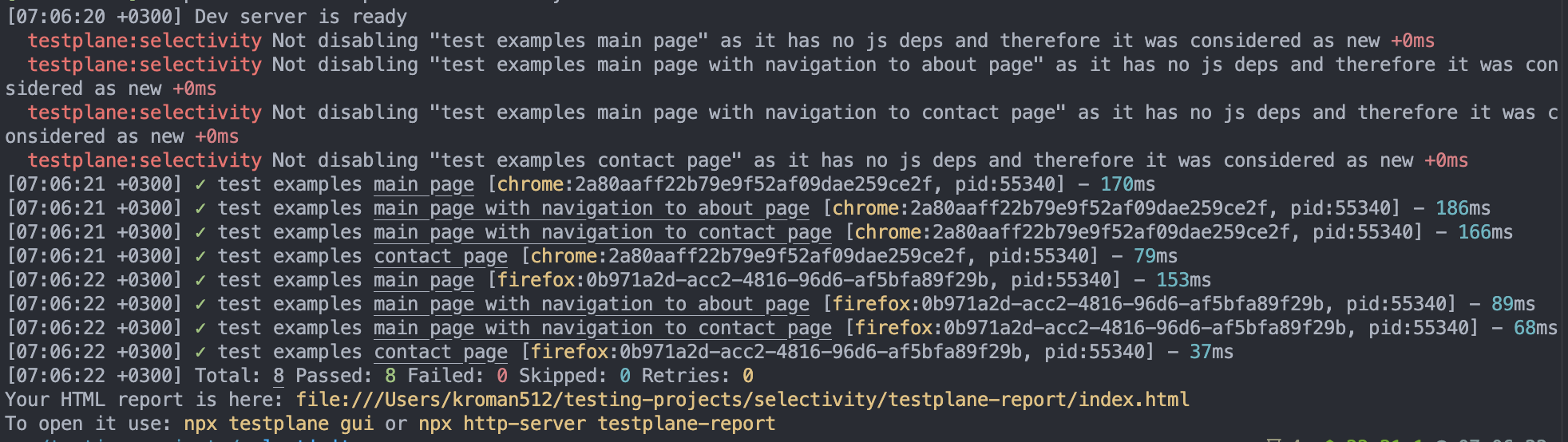
Let’s try running it again. As there are no changes, running all tests is skipped:

Now let’s change a couple of source files that are executed in the browser, and only one test that depends on the changed files will be run. The rest will be skipped by selectivity.

The same applies to test code selectivity: let’s create ./testplane-tests/my-module.ts:
export const foo = () => {
    throw new Error("bar");
};
And use it in the test file:
import { foo } from "./my-module";

describe("test examples", () => {
    it("main page", async ({ browser }) => {
        foo();
        await browser.url("/");
    });
    // The rest of the tests
});
Now while processing the test file Testplane noticed that it now depends on another file, which means the functionality might have changed, so all tests in this file will be run:
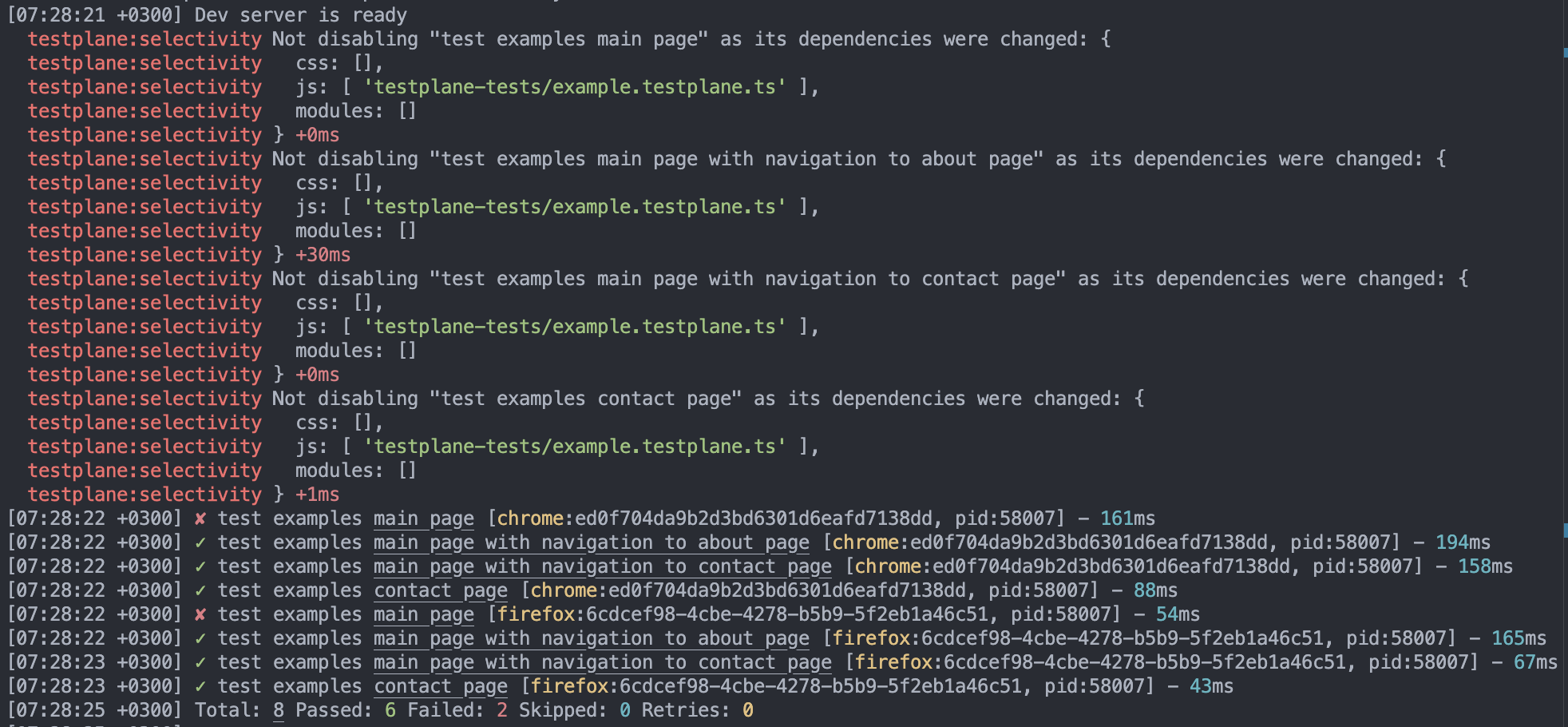
Since the tests failed, the new state was not saved, so re-running the tests will run the same set of tests again.
Important details
Collecting browser dependencies
Testplane records browser dependencies only in the Chrome browser, because dependency collection works via the Chrome Devtools Protocol. However, if you have multiple browsers (for example, Chrome and Firefox), Firefox will still be able to use the list of browser dependencies for a test that was collected in Chrome.
SourceMap requirement
For selectivity to work correctly, SourceMap generation is required. Thanks to SourceMaps, the browser can understand which source file the executed code belongs to. If a SourceMap is not generated for a code file, Testplane won’t be able to determine which source file the executed code comes from, and selectivity will not work correctly.
Server-side code and disableSelectivityPatterns
Testplane cannot track code that runs on your server, regardless of the language it’s written in. Therefore, it’s recommended to add your server-side code to the disableSelectivityPatterns option — any change to files matching these patterns will disable selectivity and run all tests.
If you are using the reactStrictMode option of the Next.js framework, rendering pages in the browser as well will allow Testplane to account for these files as if this were a regular SPA application. However, code executed exclusively on the server (such as API request handlers) will not be considered by Testplane’s selectivity.
You should also add your Testplane configuration files (for example, testplane.config.ts) to disableSelectivityPatterns, since changing them can affect the behavior of any test.
Do not add node_modules to disableSelectivityPatterns — this will significantly slow things
down. Testplane tracks the used modules from node_modules on its own.
Example disableSelectivityPatterns configuration:
selectivity: {
    enabled: true,
    disableSelectivityPatterns: [
        "testplane.config.ts",
        "backend/**/*.py",  // server-side code in Python
        "server/**/*.go",   // server-side code in Go
    ]
}
Manually disabling selectivity
When you use other filtering methods when running Testplane (such as specifying a path to a test file or using the --grep and --set options), selectivity is automatically disabled.
You can also disable selectivity manually using an environment variable:
testplane_selectivity_enabled=false # disable
Configuration
Additional information about selectivity configuration is provided in the browsers-selectivity section of the documentation.